Out with the Old, in with the… Old
Alternate title: “How Many Words Does it Take to Convince Myself that Building a New Computer was Justified?”
I wrote back in April, 2022 about my experience building a gaming PC within teenage engineering’s little computer-1 case. Perhaps I ought to start with a long-term review of that project, because it’s been nearly four years. In a word, the computer-1 has been perfect. I have not had a single reason to crack open that tiny orange box and tinker with its innards since I completed it. Rather, it continues to chug along today, just as happily, dutifully, stylishly as it did four years ago, with all of the original components I wedged into it. There’s not really a thing wrong with it.
Except that there is, actually
Well, I guess there is at least one thing wrong with it. When I decided that it was time for an upgrade, my intention was to gut the computer-1, sell all of its perfectly-working parts, and build an all-new mini-ITX PC inside. I love the case so much that I am in no hurry to remove it from my desk. As an object, it still has my full admiration. The more I shopped for parts, though, the harder it became to ignore reality: it’s quite difficult to build a more powerful machine inside the computer-1 than I had already managed four years ago. All I could really do is build the same thing again, just with a CPU and GPU that are two generations newer. That would be better, yes, but I would have to buy a new motherboard, CPU, cooler, and GPU at a minimum. (And the GPU was purely hypothetical - at the time there weren’t any RTX 50-series models small enough to fit in the computer-1.) A new Intel 800-series motherboard, 14700K CPU, and a single-fan RTX 5060 GPU (which Zotac eventually released) would cost me over $1,100 and be a relatively modest upgrade from the 12700K and RTX 3060. That seemed like a pretty clear waste of money, so I had to make peace with the fact that the computer-1 was not a viable path forward, unless I’d be content with refreshing a mid-tier PC every few years.
Ok, so now what?
Well, I guess I find a new case to build in. The computer-1 is sui generis, so it doesn’t make any sense to talk about other PC cases “like the computer-1”. I was still committed to a small form-factor (SFF) build, ITX or micro-ATX, and I was holding out for blue or orange to keep with the color scheme I have going at my desk. (Yes, I am particular.) Happily, there’s no shortage of SFF PC cases these days. We’re in a golden era of tiny computers, with every major manufacturer releasing several models for minuscule builds. I probably looked at over 100 different cases and watched hours of reviews on YouTube.
Still, absolutely nothing caught my eye. Even when I abandoned the SFF restriction and started considering (gasp!) full ATX cases for the first time in years, I was unimpressed, uninspired. With my little traffic-cone-orange computer-1 still humming along, I wasn’t about to pull the trigger on anything that wasn’t love at first sight. I could afford to wait for the one, the next case that would make me excited to build in it.
…And then I found it
When I stumbled on the computer-1 years ago, it blindsided me. I had no idea that I could want something so small, so quirky, so senseless. It was overpriced, inconvenient, and barely fit for purpose. It was not what I was looking for. And yet when I found it, instantly nothing else would do.
So too with SilverStone’s FLP02.
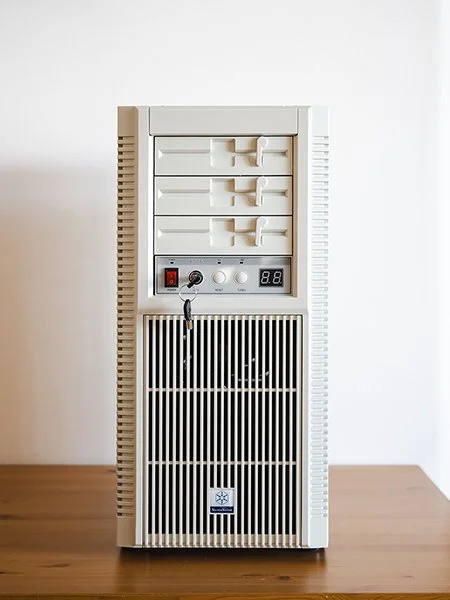
Look, I know what you’re thinking. Look at the computer-1, and then at the FLP02. Train your gaze on one, then the other, incredulous, as if I just took down a poster of Peter Dinklage in my bedroom and replaced it with one of Dwayne Johnson. The computer-1 is small even for a SFF computer, and the FLP02 is big even for a full-ATX computer. (I’ll be honest - when it arrived, I was shocked at its dimensions. It’s a goddamn piece of furniture.) If the comical sight of the two of them side-by-side doesn’t quite make it real for you, some figures: the computer-1 has a volume of 540 in³, the FLP02, 3,306 in³. With all internal components fitted, the computer-1 weighs around 10 pounds, the FLP02, 37. (That’s the weight of an average five-year-old human. The FLP02 is a five-year-old.)
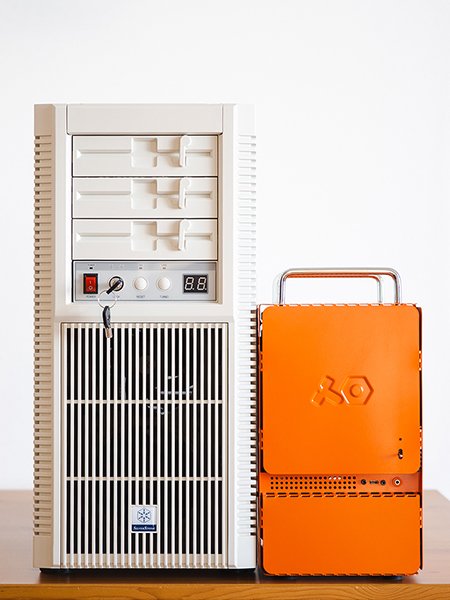
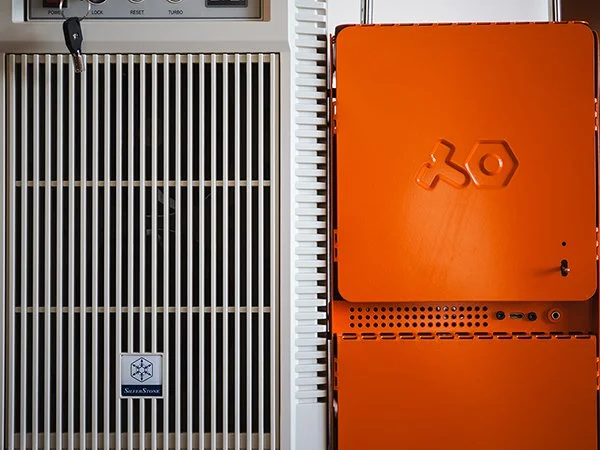
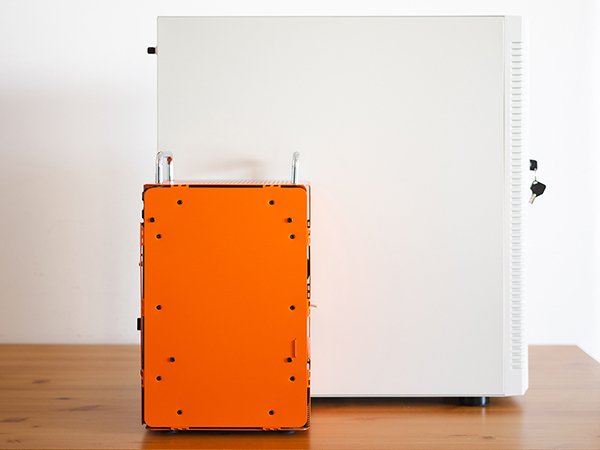
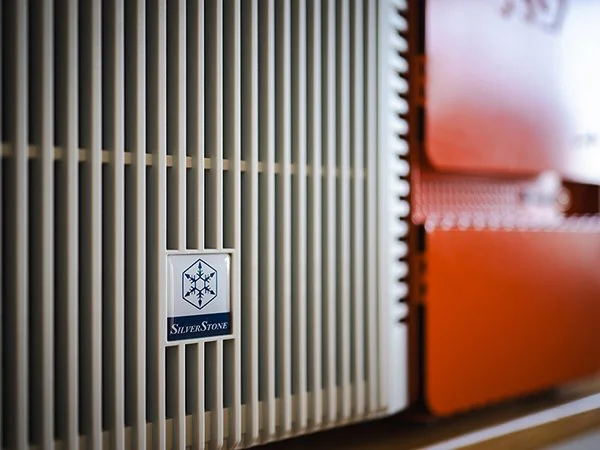
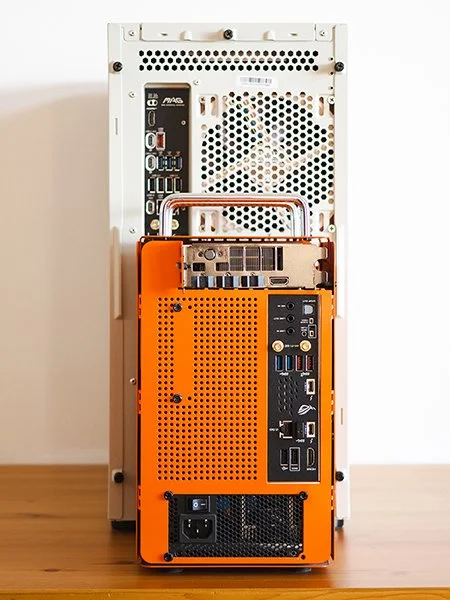
And yet the two are decidedly of one spirit - indulgent, unnecessary, aberrant, brilliant, each in its own way. Whereas the computer-1 began its life as a bespoke product only meant for teenage engineering’s staff, the FLP02 is the result of an April Fool’s Day joke that got out of hand. Neither product should exist, nor will either ever be widely popular or wildly profitable for its manufacturer. (Reductio ad absurdum: teenage engineering made a clear plastic computer-2 in 2025 that they were just giving away for free.)
The computer-1 caught my eye because it was so unlike anything else on the market, the FLP02 because it’s exactly like everything on the market… 25 years ago. I had no idea it was time for beige boxes to come back, but it’s time for beige boxes to come back. While Apple is peddling a sleek, polished aluminum Mac Studio workstation the size of a club sandwich, SilverStone decided to reanimate the corpse of a late-80s IBM clone. The sheer lawlessness of that move is itself worthy of applause.
It’s a complete role-reversal. Computers in the 1980s were beige boxes because they were supposed to blend in with the joyless off-white office environments of the day. Serious and utilitarian, a computer enclosure needed only to fit on a shelf and not draw too much attention to itself. This is precisely what a cutting-edge modern workstation like the Mac Studio is designed to do - stay out of the way and not look too conspicuously like a computer. The Mac Studio is the Compaq Presario of 2026. Droll. Lame. Cringe.
The FLP02 is a slap in the face to all modern design sensibilities. This hulking lump of riveted steel won’t even fit on many desks or shelves. It can house six 120mm fans to move air through its cavernous insides. It has four 5.25” (yes, they’re real) drive bays for devices that most people stopped using a decade ago. It has a TURBO button. The simple fact of its existence will be incomprehensible to anyone born in the 21st century. It is neither cute nor clever. It is offensive.
Obviously I love it. Sign me up, take my money - this is the computer case for me. Annoyingly, SilverStone announced this thing in the first half of 2025 - I decided I wanted one in June - but was not releasing it until the end of 2025, maybe not even until early 2026.
So I waited patiently. Again, the computer-1 was still performing its duties expertly, handling my daily computing without too much fuss, so I had no problem waiting for the FLP02.
…and then AI data centers started buying up all the RAM in the world
It was around December of last year when I started to see headlines about the coming ‘RAMpocalypse’ in my newsfeed. AI data centers, sprouting like nuclear powered weeds, were quickly gobbling up all of the world’s supply of DDR5 memory, and companies like Micron were happy to sell it to them (and not to consumers like me). RAM, which had been so inexpensive for so long that it scarcely merited a thought in a PC build, was now rapidly ballooning in price and dwindling in supply. The headlines did not suggest that this was a problem I could wait out; RAM prices were likely to keep climbing and, if they did stabilize, it would be at a much higher cost than now.
This forced my hand. So even though I didn’t have a case to put anything into, I started ordering all of the components I’d need to build the new machine whenever I could get my hands on an FLP02. Unlike the computer-1, the FLP02 doesn’t really limit PC building in any way - it’s effectively infinitely capacious for normal applications. To make the computer-1 work, I had to choose the components very carefully, often from a small list of parts that would even fit inside it and work together. With the FLP02, I could do anything. That meant many decisions had to be made about hardware specs and cooling, so here’s how I thought about those decisions:
Motherboard and CPU - AMD or Intel?
This is a momentous occasion. As far as I can remember, I have never built a PC with an AMD processor before. (I think I may have owned a machine with a K6-2 back in the late 90s, but I didn’t build it.) For gaming applications at least, it seems that AMD has had the better of Intel in the current generation of CPUs, and since I’m not restricted in what I can bolt into the FLP02, I reached for the Ryzen 9 9950X3D. This is the best performing CPU for desktop computing at the moment, so I went for it. I think this is also the first time I’ve ever built a machine with a top-tier CPU.
Cooling the 9950X3D - AIO or air cooler?
The obvious choice for cooling a high-performance CPU like the 9950X3D would be a stout AIO. They have been my preference for many years; in fact the computer-1 is the only computer I’ve built in probably the last 10 years that doesn’t use an AIO, and that was only because it was too small to accommodate one. However. Since the FLP02 looks like a PC from the time before AIOs existed, I’ve decided to preserve the spirit of 1980s computing and use a traditional fan and heatsink cooler. I did do some research beforehand to make sure this wasn’t a bit of stupidity, buying the best CPU on the market and then hamstringing its performance with substandard cooling, but it seems that the best heatsink coolers really can compete with AIOs. Enter the Noctua NH-D15 G2 LBC, a comically overengineered sculpture of aluminum with two bespoke 140mm fans. When I took it out of the box, I was genuinely concerned that I wouldn’t be able to close the side of the case with this thing installed, but then I remembered that the case is the FLP02. It fits.
The up-to-$4,000 question - GPU?
Herein lies the most interesting question for modern PC builders. Which GPU am I going to put into this thing, and how many of my internal organs will I need to sell in order to finance it? Although I jumped ship from Intel and went for AMD, I decided not to do the same and ditch NVIDIA for ATI, even though NVIDIA’s launch of the 50-series was a disaster, and everyone generally dislikes them. That still leaves me with a pile of GPUs to sort through, from the RTX 5090 all the way down to the 5050.
5090 | 5080 | 5070 Ti | 5070 | 5060 Ti 16 GB | 5060 Ti 8 GB | 5060 | 5050
Some easy decisions first: I’m not paying for a 5090. I’m not even paying for a 5080.
5090 | 5080 | 5070 Ti | 5070 | 5060 Ti 16 GB | 5060 Ti 8 GB | 5060 | 5050
I built the computer-1 with a 3060, so I want something that’s a significant upgrade, especially now that I’m not limited to smaller GPUs. Even though it’s a small, one-fan model, the 3060 I have has 12 GB of VRAM, so I can eliminate all of the 50-series models that only have 8 GB.
5090 | 5080 | 5070 Ti | 5070 | 5060 Ti 16 GB | 5060 Ti 8 GB | 5060 | 5050
Only three models to pick from now. The 5070 looks like a sensible middle-of-the-road choice and would be a significant upgrade over the 3060, but the fact that it has no additional VRAM makes it less attractive, given how much it costs. So that left me with two choices: the 5070 Ti and 5060 Ti 16 GB. There’s a big price difference between the two, but there’s also a big performance difference. Since I’m looking for a hefty upgrade with future-proof performance for several years, I opted for the 5070 Ti. I found an MSI Ventus model that was going for pretty close to MSRP on Amazon, so I snagged one.
I had spent most of the first year after the launch of the RTX 50-series waiting for prices to calm down, since demand initially far outstripped supply. By December 2025, prices for most models were settling down around MSRP, but I was still hopeful that prices would drop further, or that I could wait for a “Super” refresh of the product line and get more for my money. The RAM crisis, though, seeped into the GPU world, and not only did prices not sink below MSRP, they started climbing again. NVIDIA then scaled back or altogether stopped producing several 50-series models, including the 5070 Ti, which is now extremely hard to find and priced well above what I paid for it - Amazon currently lists the same card at $1,059, a 33% increase over what I paid less than two months ago!
What about the RAM, then?
When I first thought about upgrading or replacing the computer-1, the plan was to put 64 GB of RAM into the next machine. 32 GB is and has been the norm for most applications for years, but since RAM was cheap and I was building in a full (and then some) ATX case with a four-DIMM-slot motherboard, why not go for 64 GB? I’ll tell you why not. By the time I got around to ordering the memory for this build, it had more than doubled in cost. 32 GB of DDR5 for this machine cost me $367. As I write this, that same 2x16 GB kit is now listed for $399. When I built the computer-1, I paid just $185 for 32 GB. It doesn’t look like RAM prices are going to come back down to Earth in the next year, so 32 GB had better be good enough.
Miscellaneous, et cetera
The rest of the details are fairly mundane: it’s got a modular 850 watt ATX power supply (3.1, with the new 12V-2x6 connector type for the GPU) and two M.2 NVMEs for OS and storage. Keeping with the 1980s computing spirit, though, I treated myself to another nostalgic blast from the past: a 3.5” hard disk. You know, those chonky bois with the spinning platters inside ‘em. I have no idea when I last bought an honest-to-goodness HDD… maybe 15 years ago? Because they are still dirt cheap (and not affected by data center voracity… yet), and I have plenty of space in the FLP02, I bought an 8 TB Seagate BarraCuda. Cost me all of $140. 8 terabytes! 1.21 gigawatts!
Let’s talk cooling. I’ve crammed a lot of heat-generating items into this metallic ogre, so I need to make sure it’s got plenty of fresh air moving through it. The FLP02 comes with three preinstalled 120mm case fans, all of which I’m sure are quiet and efficient. I removed them immediately and ‘roided this thing out with five ugly Noctua case fans, two 120mm in the front for intake and three 140mm at the top and back for exhaust. This is not necessary, which is perfect for the FLP02. All five case fans are connected to the included fan controller, which displays the system fan speed (in percent) on the front panel. Pressing the TURBO button immediately puts all case fans at 100% thrust, possibly accelerating the case across the room, we’ll see.
Microsoft, the 🐘 in the room
I have been holding on to Windows 10 like grim death for the past year and a half. I enrolled in extended security updates, which will keep me patched up for another several months, but there will come a time when this stalwart OS will no longer be serviceable. Windows 11 looms large, its reputation souring by the day and Microsoft already backpedaling on its massive AI integration push. The last time I was this averse to an OS “upgrade” was when Windows 8 came out. It was terrible, universally hated, and quickly patched before being replaced entirely by Windows 10. The difference with Windows 10 and 11 is that Microsoft is effectively forcing 10 users to upgrade to 11 by ending support for the older version, something that did not happen during the Windows 7, 8, 10 era. Different solutions to this problem are emerging; some people are just staying on Windows 10 even though their hardware is 11-ready, while others are dumping Windows entirely for Mac OS and Linux.
I’ve had to rewrite the entire next section of this article, because I committed to but ultimately abandoned a dual-boot solution with Windows 11 and Pop!_OS (Linux). In theory this was a great idea: bite the bullet on Windows 11 but only use it for things that I absolutely must do in Windows, then do everything else in Linux. Pop!_OS is reportedly very friendly as a Linux distro for people who don’t know Linux well, and there’s a version that comes preloaded with NVIDIA drivers. I could probably do most, perhaps all of my gaming in Linux, as well as my daily web-based computing. I’d probably only have to dip into Microsoft’s AI-integrated hellscape for photo processing in Adobe products, which don’t run in Linux. So I went through the faff of setting up the dual-boot (for it was a faff, and a half of another faff) and eventually got it running. And then two things happened: I updated the BIOS in the machine to the latest version, and Windows 11 installed its latest update. I don’t know which of those two things broke the boot loader (it could have been both of them, honestly), but it done broke the boot loader. The machine was now booting directly into Windows 11 without asking, rendering the Linux installation inaccessible. I’m now in over my head, as I need to try to rebuild the EFI boot loader via console. I obviously have no idea how to do that, so I’m using an AI chatbot to walk me through it, and it’s just not working. I spent hours poking around at this thing, only to fail time and time again to get back to the functional dual-boot system I had before. And then I realized that this was probably going to happen repeatedly, as Windows 11 updates will sometimes just overwrite the boot loader, so I was definitely going to have to get used to doing this regularly, even with the two operating systems installed on two separate physical drives.
That’s when I pulled the plug on the whole operation and just reinstalled Windows 10. I would love to make the switch to Linux and just forget about Microsoft entirely, and perhaps that day is coming. For now, though, I really can’t live without Lightroom and Photoshop, and there are probably a handful of other things that I use regularly that don’t work in Linux. I was hoping the dual-boot compromise would be a nice bridge for now, but that really isn’t feasible with Windows 11 and my general lack of problem-solving ability when things go command line. I’m hoping I can limp along with Windows 10 until they release version 12, which will probably be much improved after years of harsh criticism for 11. It’s 7-8-10 all over again.
Right, so the FLP02 is up and running, OS and all. What’s the damage?
Full Specs and Cost (USD)
Case: SilverStone FLP02 - $179 (MSRP is more like $230, but I got it locally here in HK for much less than that 🤷♂️)
Motherboard: MSI MAG X870 Tomahawk - $240
CPU: Ryzen9 9950X3D - $623
CPU Cooler: Noctua NH-D15 G2 LBC - $180
RAM: TEAMGROUP T-Create DDR5 32 GB 5600MHz CL46 - $367
Case Fans: Noctua NF-A 12x25 (2), NF-A 14x25 (3) - $205
GPU: MSI Gaming RTX 5070 Ti 16 GB Ventus 3X OC - $799
SSDs: Crucial P510 1 TB - $139, Samsung 990 PRO 2 TB - $199
HDD: Seagate BarraCuda 8 TB - $140
PSU: MSI MAG A850GL PCIE5 850W 80+ Gold - $124
Total: $3,195 🤢🤮💀
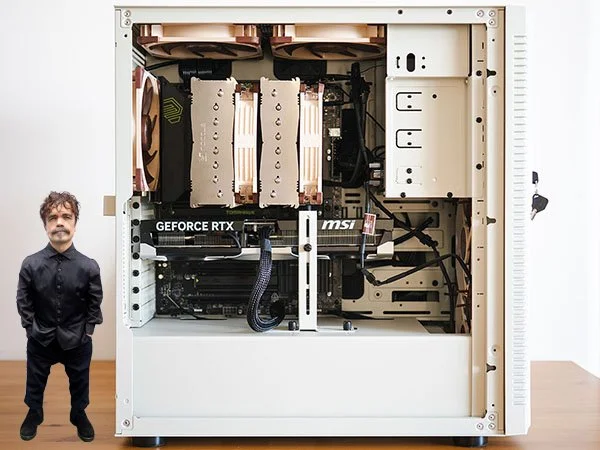
Peter Dinklage for scale.
Some notes on the cost of this thing
When I completed the computer-1 almost four years ago, it was the most expensive computer I had ever built. This is a thousand bucks more expensive than that one. A couple things to mention though. Like the computer-1, this build does not shy away from excess. It is not a budget PC. It would be trivially easy to reduce the cost of this machine considerably while preserving its performance: a smaller case, no upgraded fans, a basic AIO cooler, skipping the HDD, and a 5070 (non-TI) could shave almost $800 off the cost of this thing. The GPU is really the only place I could have spent significantly more than I did.
Buying and building this machine at the end of 2025, though, was absolutely the right thing to do, even if I was already a little bit late to the game. If I were to build the same machine today, just a couple months later, it would cost closer to $3,600, and that’s not likely the ceiling. Building a new PC in the current market is simply inadvisable, and nobody can say when the shortage will be over or when (if?) prices on components will settle back down to pre-AI-craze levels. If your PC is due for an upgrade now, I weep for you, for you are screwed.
Was it worth it?
It’s hard to work out a quantitative answer to that question, at least without some hard data to consider, so let’s look at some. I benchmarked the computer-1 and the FLP02 using Cinebench and Geekbench to compare performance on both CPU and GPU tasks. Let’s see what I got for my $3,195.
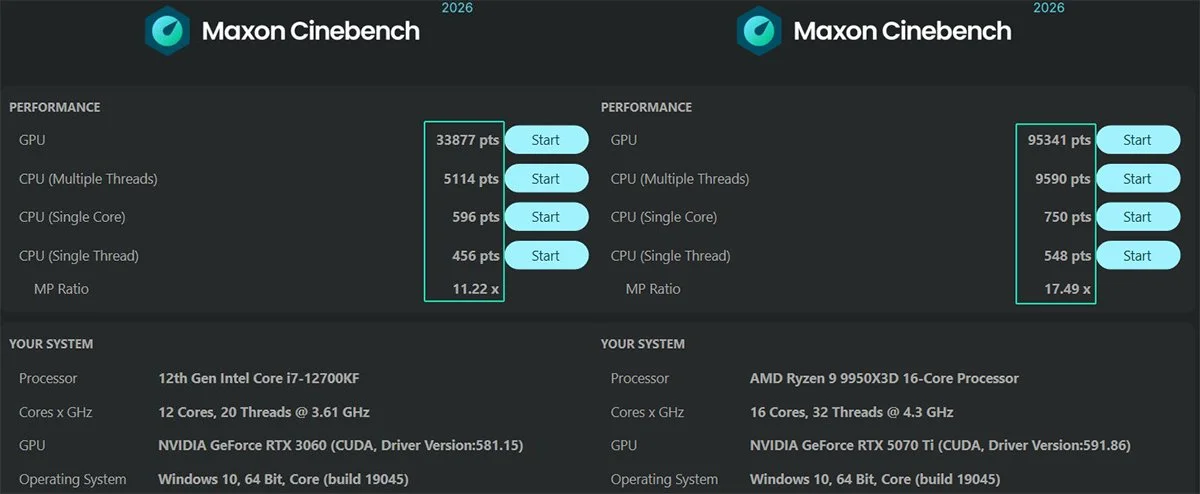
Here’s how the two compare in Cinebench 2026. (computer-1 on the left, FLP02 on the right.) As you can see, some sizeable differences in both GPU and CPU multi-thread performance - the FLP02 has a 181% and 87% performance increase, respectively. The older 12700KF processor still holds its own in a lot of tasks, though - it remains a capable CPU even today, really. Although the 9950X3D only shows modest increases in single core/single thread performance, it has more of both (16/32 to 12/20) compared with the 12700KF.
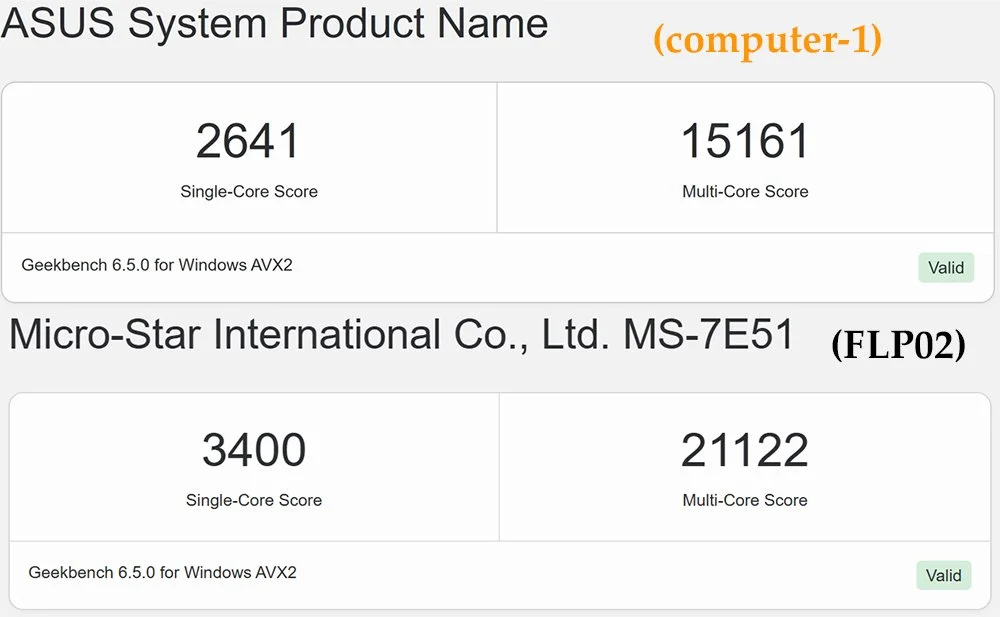
Geekbench shows a similar performance differential between the CPUs - only a 28% and 39% uplift in single- and multi-core performance, but again this doesn’t really tell the whole story. The 9950X3D has more cores and threads than the 12700KF, and it has 128MB of L3 cache compared to just 25MB.
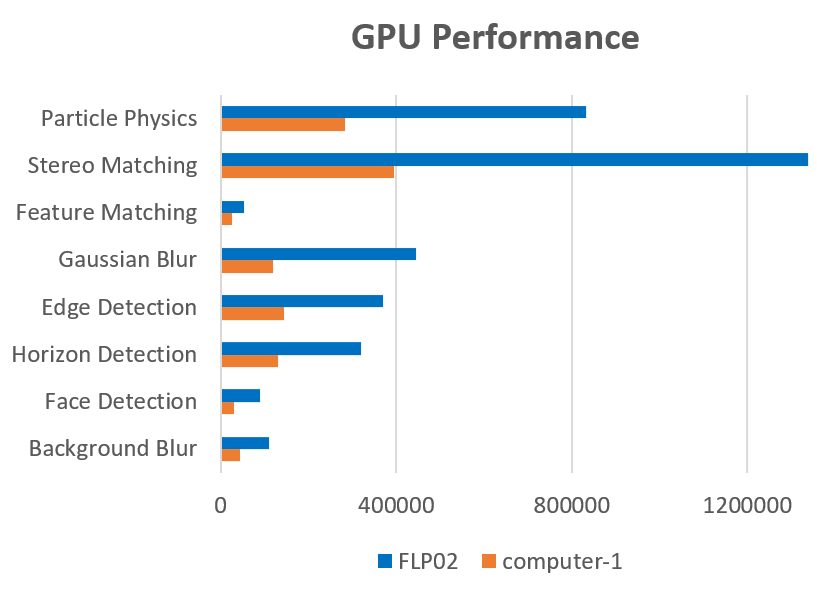
On the GPU side, though, there’s really no comparison. Here’s the data from Geekbench on Open CL. The 5070 Ti absolutely wipes the floor with the 3060.
Final thoughts
One the one hand, I’m sad to see the computer-1 disappear from my desktop. It hasn’t gone far - it’s now continuing its service in the living room as the media PC connected to the television - but I do miss its cheery orange glow. My Ikea desk is almost certainly not up to the task of supporting the weight of the FLP02, so it has taken up residence on the floor between the desk and the wall, where it will slowly warp the tile beneath it until it crashes through entirely, killing at least one of our downstairs neighbors. It’s a shame I can’t display it more prominently, because something so brash and befuddling demands to be acknowledged, whether for derision or deification. Performance-wise it does seem quite zippy; I haven’t been using it in enough real-world situations to get a comprehensive sense of just how much better it is, but it’s running smoothly and quietly, despite the ten fans of various sizes whirring about inside. I can tell you it runs No Man’s Sky in 4K at 60 FPS on ultra settings without breaking a sweat, and that alone has already brought me joy. If it turns out to be as reliable a performer as the little computer-1, I’ll be happy, but that little bugger has set the bar pretty high.
